UseCalcPro
Home
MathFinanceHealthConstructionAutoPetsGardenCraftsFood & BrewingToolsSportsMarineEducationTravel
Blog
  1. Home
  2. Crafts

Heat Press Settings Calculator

Get the exact temp, time & pressure for every transfer method and substrate

Temperature

305°F / 152°C

Time

15 sec

Pressure

Medium

Peel

Hot Peel

Temperature

305°F / 152°C

HTV (Heat Transfer Vinyl) on 100% Cotton

Press Time

15 sec

Pressure

medium

Peel Type

Hot Peel

Mirror Image?

Yes

Pre-Press
3 sec

Pre-press garment to remove moisture and wrinkles

What You'll Need

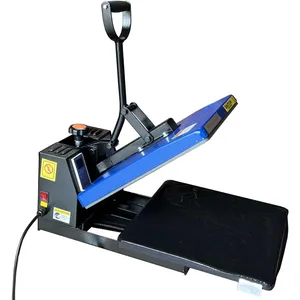
15x15 Sublimation Heat Press Machine

15x15 Sublimation Heat Press Machine

$170-$1854.5
View on Amazon
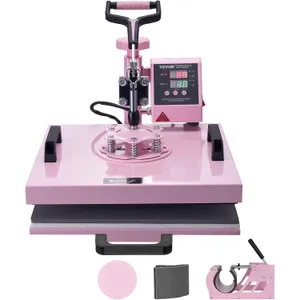
Heat Press Machine 15x15 5-in-1 with Tumbler Press

Heat Press Machine 15x15 5-in-1 with Tumbler Press

$180-$1954.2
View on Amazon
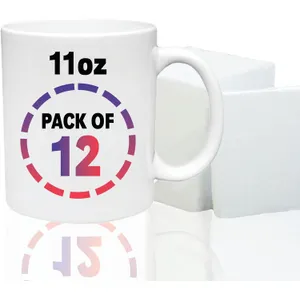
PIVOI Sublimation Blank White Mugs 11oz 12-Pack

PIVOI Sublimation Blank White Mugs 11oz 12-Pack

$25-$354.5
View on Amazon
15x15 Sublimation Heat Press Machine

15x15 Sublimation Heat Press Machine

$170-$1854.5
View on Amazon
Heat Press Machine 15x15 5-in-1 with Tumbler Press

Heat Press Machine 15x15 5-in-1 with Tumbler Press

$180-$1954.2
View on Amazon
PIVOI Sublimation Blank White Mugs 11oz 12-Pack

PIVOI Sublimation Blank White Mugs 11oz 12-Pack

$25-$354.5
View on Amazon

As an Amazon Associate, we earn from qualifying purchases.

Frequently Asked Questions

Q

What temperature should I set my heat press to for HTV on cotton?

Set your heat press to 305°F (152°C) for HTV on 100% cotton. Press for 15 seconds at medium pressure, then hot peel the carrier sheet. Always pre-press the garment for 3 seconds to remove moisture and wrinkles.

  • Pre-press garment for 3–5 seconds to remove moisture – trapped steam causes HTV to lift
  • Use a Teflon sheet or parchment paper between the press and carrier to prevent scorching
  • Mirror (reverse) your design before cutting – HTV is always applied face-down
  • Wait 24 hours before first wash; wash inside-out on cold to extend vinyl life by 50+ washes
  • If edges lift after peeling, re-press for 5 seconds with the Teflon sheet over the vinyl
Q

What is the difference between HTV and sublimation?

HTV (heat transfer vinyl) is a cut material that sits on top of the fabric and works on cotton, polyester, and blends. Sublimation uses special ink that converts from solid to gas and bonds with polyester fibers, producing vibrant, permanent prints that never crack or peel. Sublimation does not work on cotton.

  • HTV works on cotton, polyester, and blends; sublimation requires 65%+ polyester content
  • HTV cost: $0.50–$2.00 per sq ft; sublimation ink: $0.02–$0.10 per print on transfer paper
  • HTV lasts 50–75 washes before cracking; sublimation is permanent and never peels
  • Sublimation is best for all-over prints and photos; HTV is better for single-color text and logos
  • DTF transfers bridge the gap – work on all fabric colors and cost $0.30–$0.80 per transfer
MethodTemperatureTimeFabric Compatibility
HTV305°F15 secCotton, polyester, blends
Sublimation400°F60 secWhite/light polyester only
DTF325°F15 secAll fabrics, all colors
Infusible Ink400°F40 secCricut blanks, poly-coated
Q

What do light, medium, and heavy pressure mean on a heat press?

Light pressure means a gentle push, around 2–3 on a pressure dial, used for delicate fabrics like nylon. Medium pressure is a firm press at 4–6 on the dial, suitable for most HTV and DTF applications. Heavy pressure is a strong clamp at 7–8+, required for sublimation and infusible ink to fully transfer the design.

  • Light (2–3): nylon, silk, and thin performance fabrics that scorch or melt easily
  • Medium (4–6): cotton T-shirts, hoodies, and poly-blend garments with HTV or DTF
  • Heavy (7–8+): sublimation and infusible ink need maximum contact for full ink transfer
  • Test with a sheet of paper – at correct pressure it should slide out with firm, even resistance
  • Uneven pressure causes partial transfers – check that the platen is level with a heat gun thermometer
Q

Can I sublimate on dark-colored garments?

Sublimation ink is transparent, so it only works well on white or very light-colored polyester garments. On dark fabrics the design will be invisible or severely washed out. For dark garments, use HTV or DTF transfers instead, which apply an opaque layer on top of the fabric.

  • Sublimation only works on white or pastel substrates – ink has no white pigment layer
  • For dark cotton: use white HTV as a base layer, then layer printed HTV on top
  • DTF transfers print a white ink under-layer, making them ideal for dark fabrics at $0.30–$0.80 each
  • Infusible Ink by Cricut works on dark blanks with a poly-coated white surface
  • Always test a 2×2" swatch before committing to a full design on any new substrate

Example Calculations

1HTV on a Cotton T-Shirt

Inputs

Transfer MethodHTV (Heat Transfer Vinyl)
Substrate100% Cotton
Garment ColorLight

Result

Temperature305°F (152°C)
Press Time15 seconds
PressureMedium
Peel TypeHot peel
Mirror ImageYes

HTV on cotton is the most common heat press application. Press at 305°F for 15 seconds with medium pressure. The carrier sheet is peeled while still hot. Always mirror your design before cutting.

2Sublimation on Polyester

Inputs

Transfer MethodSublimation
Substrate100% Polyester
Garment ColorLight

Result

Temperature400°F (204°C)
Press Time60 seconds
PressureHeavy
Peel TypeHot peel
Mirror ImageYes

Sublimation requires high heat (400°F) and heavy pressure for a full 60 seconds. The ink turns to gas and permanently bonds with the polyester fibers. Pre-press for 5 seconds to remove moisture.

Formulas Used

Celsius to Fahrenheit

°F = (°C × 9/5) + 32

Convert heat press temperature between Celsius and Fahrenheit scales.

Where:

°F= Temperature in Fahrenheit
°C= Temperature in Celsius

Settings Lookup

Settings = Lookup(Transfer Method, Substrate)

Heat press settings are determined by the combination of transfer method and substrate material. Each combination has a specific temperature, time, and pressure recommendation from manufacturer testing.

Where:

Transfer Method= HTV, sublimation, DTF, or infusible ink
Substrate= Material being pressed: cotton, polyester, blend, nylon, ceramic, or metal

Heat Press Settings: Temperature, Time & Pressure for Every Transfer Method

1

HTV on Cotton: The Most Common Heat Press Application

305°F for 15 seconds at medium pressure is the universal starting point for standard HTV (heat transfer vinyl) on 100% cotton — the combination used by 70%+ of home crafters and small apparel businesses. This setting works for Siser EasyWeed, Cricut Everyday Iron-On, and most generic HTV brands within a ±5°F tolerance.

Pre-pressing the garment for 3–5 seconds before applying the transfer is a step many beginners skip, and it causes the majority of adhesion failures. Moisture trapped in cotton fibers creates steam during the main press, lifting the vinyl before it can bond. A quick pre-press evaporates surface moisture and flattens wrinkles that would create air pockets under the vinyl.

After pressing, peel the carrier sheet while still warm (hot peel) for standard HTV. If edges lift during peeling, re-press for 5 additional seconds with a Teflon sheet over the vinyl. Wash garments inside-out on cold after a 24-hour cure period — this extends HTV life to 50+ washes before any cracking appears.

Tip: Pre-press every garment for 3–5 seconds before applying any transfer. This removes moisture that causes 80%+ of adhesion failures in heat press work.

2

Transfer Method Comparison: HTV vs. Sublimation vs. DTF

HTV, sublimation, and DTF (direct-to-film) each serve different niches. HTV works on any fabric color and type but sits on top of the fabric, eventually cracking after 50–75 washes. Sublimation bonds permanently with polyester fibers and never peels, but only works on white or light-colored 65%+ polyester substrates. DTF bridges the gap — it works on all fabric types and colors with a white under-layer at $0.30–$0.80 per transfer.

Temperature requirements vary significantly. HTV needs just 305°F for 15 seconds, making it the fastest and lowest-temperature method. Sublimation requires 400°F for a full 60 seconds — the higher heat converts solid dye particles to gas that penetrates polyester fibers. DTF transfers press at 325°F for 15 seconds, a middle ground that works with a wider substrate range.

Cost per print differs by method and volume. HTV costs $0.50–$2.00 per square foot of material, making single-color designs economical but multi-color expensive. Sublimation ink costs just $0.02–$0.10 per print on transfer paper, ideal for full-color photos and gradients. DTF gang sheets at $0.30–$0.80 per transfer offer the best value for small-batch multi-color designs.

Settings for standard applications; always verify with manufacturer specifications
MethodTemp / TimeFabric TypesCost/Print
HTV305°F / 15 secCotton, poly, blends$0.50–$2.00/ft²
Sublimation400°F / 60 secWhite/light poly only$0.02–$0.10
DTF325°F / 15 secAll fabrics, all colors$0.30–$0.80
Infusible Ink400°F / 40 secCricut blanks, poly-coated$0.50–$1.50
3

Specialty HTV Types: Glitter, Flock, Puff & Foil

Glitter HTV needs 320°F for 20 seconds with firm pressure and a cold peel (wait until completely cool before removing the carrier sheet). The extra 15°F and 5 seconds ensure the glitter particles fully embed in the adhesive layer. Hot peeling glitter HTV pulls particles away, creating bald spots in the design.

Flock HTV creates a soft, velvety raised texture and presses at 305°F for 20 seconds with light pressure. The light pressure is critical — heavy pressure flattens the flock fibers and destroys the velvety texture. Puff HTV is the newest specialty: it presses at 340°F for just 12 seconds with light pressure, then puffs (rises) during the heat application for a 3D raised effect.

Foil HTV ($2.20/ft²) produces a mirror-like metallic finish. It presses at 305°F for 15 seconds like standard HTV but requires a cold peel and is more sensitive to pressure variations. Glow-in-the-dark HTV ($3.00/ft²) is the most expensive specialty type, pressing at 305°F for 15–20 seconds and requiring 2+ hours of light exposure to fully charge.

  • Standard HTV: 305°F, 15 sec, medium pressure, warm peel — $0.80/ft²
  • Glitter HTV: 320°F, 20 sec, firm pressure, cold peel — $1.50/ft²
  • Flock HTV: 305°F, 20 sec, light pressure, cold peel — $1.80/ft²
  • Puff HTV: 340°F, 12 sec, light pressure, warm peel — $2.00/ft²
  • Foil HTV: 305°F, 15 sec, medium pressure, cold peel — $2.20/ft²
4

Understanding Pressure Settings: Light, Medium & Heavy

Pressure is measured on a 1–10 dial on most heat presses, where 2–3 is light, 4–6 is medium, and 7–8+ is heavy. The correct pressure ensures full contact between the transfer and substrate — uneven pressure is the #1 cause of partial transfers where some areas adhere and others peel.

Light pressure (2–3) is used for delicate substrates that scorch or melt under compression: nylon, silk, thin performance fabrics, and puff HTV. Medium pressure (4–6) covers most daily applications including HTV on cotton, DTF on hoodies, and HTV on poly-blend garments. Heavy pressure (7–8+) is required for sublimation and infusible ink where maximum contact ensures complete ink transfer.

To check pressure calibration, close the press on a sheet of paper. At correct medium pressure, the paper should slide out with firm, even resistance across the entire platen. If one side pulls freely while the other grips, the platen is misaligned — adjust the pressure arm or use a heat gun thermometer to verify temperature uniformity across the surface.

Tip: Test pressure with a paper sheet before your first press of the day. If the paper slides unevenly, the platen needs leveling — this prevents partial transfers and wasted material.

5

Troubleshooting Common Heat Press Failures

85% of heat press failures trace back to three causes: incorrect temperature, insufficient time, or moisture in the garment. A $10 infrared thermometer verifies actual platen temperature (many presses are off by 10–15°F from the displayed setting). A kitchen timer ensures exact press duration — even 5 seconds too short can cause peeling within the first wash.

Vinyl peeling after washing is almost always caused by insufficient initial press time or temperature. Re-pressing a peeled design rarely fixes the issue because the adhesive has already partially released. For HTV that consistently peels after washing, increase temperature by 5°F and time by 3 seconds from the standard setting.

Scorching (yellowing or browning of fabric) results from too much heat, too much time, or too much pressure. Light-colored cotton is most susceptible. Always use a Teflon sheet or parchment paper as a protective barrier between the press and the garment. If scorching occurs, reduce temperature by 10°F and use light-medium pressure instead of heavy.

  1. 1

    Verify actual platen temperature

    Use an infrared thermometer at 3 points across the platen. Presses are commonly off by 10–15°F. Adjust the dial until the actual reading matches your target.

  2. 2

    Pre-press every garment

    Press for 3–5 seconds to remove moisture and wrinkles. This single step prevents the majority of adhesion failures.

  3. 3

    Apply transfer with protective sheet

    Place transfer face-down (HTV) or face-up (sublimation/DTF). Cover with a Teflon sheet. Press at the correct time and pressure for your method.

  4. 4

    Peel at the correct temperature

    Warm peel for standard HTV (immediately after opening). Cold peel for glitter, flock, and foil (wait 30–60 seconds until cool to touch).

Related Calculators

Fabric Yardage Calculator

Calculate how much fabric you need for sewing projects

Screen Printing Calculator

Estimate ink usage and costs for screen printing

Resin Calculator

Calculate resin and hardener amounts for your molds

DTF Printing Cost Calculator \u2014 Ink, Film & Profit Analysis

Calculate DTF printing costs per transfer including ink, film, and hot-melt powder. Analyze profit margins, compare with screen printing, and find break-even.

Sublimation Cost Calculator \u2014 Per-Unit Pricing & Profit Margins

Calculate sublimation printing costs per unit including blanks, ink, paper, labor, and overhead. Get suggested retail pricing and profit margin analysis.

Laser Engraving Calculator \u2014 Time, Speed & Power Settings

Calculate laser engraving time, speed, and power settings for wood, acrylic, leather, and metal. Compare DPI options and energy costs for CO2 and diode lasers.

Related Resources

Pizza Dough by Weight: Hydration, Fermentation & Style Guide for Home Ovens

Read our guide

Cooking Time Calculator: How Long to Cook Meat by Weight

Read our guide

Oven Temperature Conversion: Fahrenheit, Celsius & Gas Mark Guide

Read our guide

Fabric Yardage Calculator

Calculate fabric for your project

Canvas Calculator

Plan canvas size and materials

Tie Dye Calculator

Calculate dye amounts

More Crafting Calculators

Explore all our free calculators for crafts, sewing, and DIY projects

View All Crafts Calculators

Last Updated: Mar 26, 2026

This calculator is provided for informational and educational purposes only. Results are estimates and should not be considered professional financial, medical, legal, or other advice. Always consult a qualified professional before making important decisions. UseCalcPro is not responsible for any actions taken based on calculator results.

UseCalcPro
FinanceHealthMath

© 2026 UseCalcPro